ugit
RepoInfo Panel
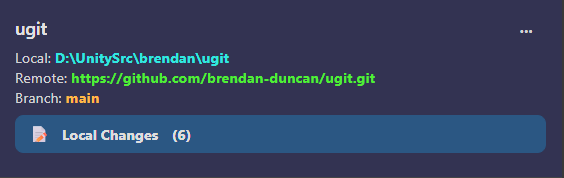
The RepoInfo panel displays key information about your repository at a glance. It’s located at the top of the repository view.
What’s Displayed
The panel shows:
| Field | Description |
|---|---|
| Local | The full path to your repository on your computer |
| Remote | The URL of the remote repository (e.g., origin) |
| Branch | The currently checked-out branch |
| Local Changes | Click to view unstaged and staged files |
Local Changes Section
The Local Changes section shows:
- Count — Number of modified files
- Click — Opens the Local Changes panel to stage, unstage, or commit files
- Cache indicator — Shows when using cached data
Menu
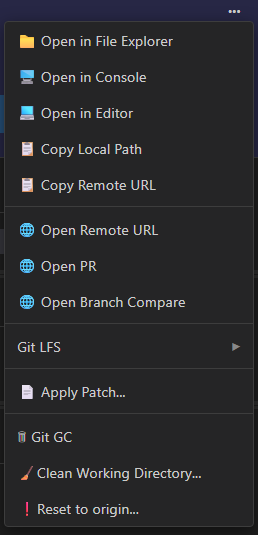
The Repo Info menu is accessed via the “…” label on the upper-right of the panel.
Repository Actions
| Action | Description |
|---|---|
| Open in Explorer | Open the repository folder in your file explorer |
| Open in Console | Open a terminal/command prompt in the repository folder |
| Open in Editor | Open the repository in your default code editor |
Remote Actions
| Action | Description |
|---|---|
| Edit Remote URL | Change the remote (origin) URL |
| Copy Remote URL | Copy the remote URL to clipboard |
| Open on Remote | Open the repository page in your browser |
| Open Pull Request | Open the PR creation page (if supported) |
| Open Compare | Open the comparison view on the remote |
Stash Actions
| Action | Description |
|---|---|
| Stash Changes | Temporarily save uncommitted changes |
| Stash Pop | Apply the most recent stash |
| Stash Drop | Delete the most recent stash |
Git LFS Actions
| Action | Description |
|---|---|
| Add Track Pattern | Track files matching a pattern with Git LFS |
| Status | View Git LFS file status |
| Fetch | Fetch LFS objects from remote |
| Pull | Pull LFS objects from remote |
| Prune | Remove old LFS objects |
| Deinitialize | Remove Git LFS from this repository |
Maintenance Actions
| Action | Description |
|---|---|
| Apply Patch | Apply a .patch file to your repository |
| Git GC | Run garbage collection to optimize repository |
| Clean Working Directory | Remove untracked files |
| Reset to Origin | Discard all changes and reset to remote |
Quick Actions
Copy Repository Path
Right-click → Copy Local Path to copy the repository folder path to your clipboard.
Open in Browser
If you have a remote configured (like GitHub or GitLab), you can:
- Open on Remote — View the current branch on the website
- Open Compare — Compare branches
- Open Pull Request — Create a new PR (GitHub/GitLab)
Example Workflows
Viewing Local Changes
- Look at the Local Changes count in the RepoInfo panel
- Click on it to open the Local Changes panel
- Stage or unstage files as needed
Syncing with Remote
- Right-click on RepoInfo panel
- Select Open in Console
- Run
git pullto sync changes
Managing Remote URL
- Right-click on RepoInfo panel
- Select Edit Remote URL
- Enter the new URL
Related
- Local Changes Panel — Stage, unstage, and commit files
- Branches — Managing local branches
- Remotes — Working with remote repositories