ugit
Branches
The Branches panel displays all local branches in your repository. You can view commit history, switch branches, create new branches, and manage existing branches.
Viewing Branches
Local Branches

Local branches are shown in a tree structure:
- Current branch is marked with a filled circle (●)
- Branch status shows ahead (↑) and behind (↓) counts relative to remote
- Double-click a branch to switch to it
Switching Branches
Method 1: Double-Click
Double-click any branch to check it out and make it your current branch.
Method 2: Context Menu
- Right-click on a branch
- Select Checkout
Uncomitted changes when switching branches
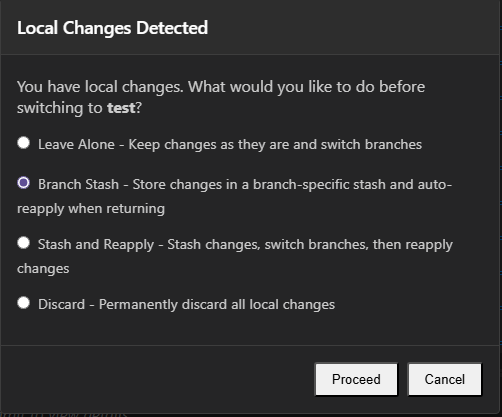
If you have uncomitted changes when you switch branches, a dialog will give you options on what to do with those changes.
-
Leave Alone Do not do anything with the changes. -
Branch Stash Stash the local changes with the branch name. When you switch back to this branch, the stash will automatically be re-applied. -
Stash and Reapply Stash the local changes, and re-apply the stash on the new branch. -
Discard Discard any local changes before switching to the new branch.
Creating Branches
From Current Branch
- Right-click in the Branches panel
- Select New Branch…
- Enter a branch name
- Optionally check Checkout after create to switch to the new branch
- Click Create
From a Specific Commit
- Right-click on a commit in the commit list
- Select New Branch from Commit
- Enter a branch name
- Click Create
Branch Context Menu
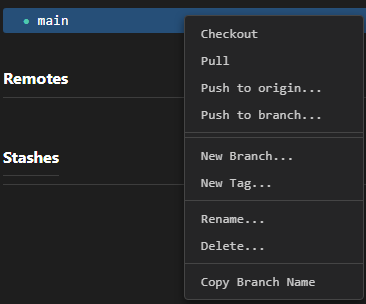
Right-click on any branch for additional options:
| Action | Description |
|---|---|
| Checkout | Switch to this branch |
| Pull | Pull latest changes from remote |
| Push to Origin | Push this branch to remote |
| Merge into Active | Merge this branch into current branch |
| Rebase Active onto Branch | Rebase current branch onto this branch |
| New Branch | Create new branch from this branch |
| New Tag | Create tag at this branch’s position |
| Rename | Rename this branch |
| Delete | Delete this branch |
| Copy Branch Name | Copy branch name to clipboard |
Deleting Branches
- Right-click on the branch
- Select Delete
- Confirm the deletion
⚠️ You cannot delete your current branch. Switch to another branch first.
Merging Branches
Merge Another Branch into Current
- Right-click on the branch you want to merge
- Select Merge into Active
- Resolve any conflicts if necessary
- Commit the merge
Rebase Current Branch
- Right-click on the branch you want to rebase onto
- Select Rebase Active onto Branch
⚠️ Warning: Rebasing rewrites commit history. Avoid on shared/public branches.
Branch Naming
Best Practices
- Use descriptive names (e.g.,
feature/login-page,bugfix/header-issue) - Use slashes for grouping (e.g.,
feature/,bugfix/,hotfix/) - Avoid special characters and spaces
- Keep names lowercase with hyphens or underscores
Common Patterns
| Pattern | Example |
|---|---|
| Feature | feature/user-auth |
| Bugfix | bugfix/login-error |
| Hotfix | hotfix/security-patch |
| Release | release/v1.0.0 |
| Experiment | experiment/new-ui |
Tips
Work on Features
- Create a new branch for each feature or bugfix
- Make commits on your feature branch
- Merge or rebase when complete
Keep Main Clean
- Keep your
mainbranch clean - Don’t commit directly to main
- Use feature branches for all changes
Sync Regularly
- Pull from remote frequently
- Keep your local branches up-to-date
Related
- Local Changes — Managing uncommitted changes
- Commits — Working with commit history
- Remotes — Managing remote repositories
- Stashes — Saving and applying stashed changes